outlook pst password remover

Screens

Guide

Revove PST Password Recovery Tool

Best software for recovering lost or forgotten passwords of PST files. Verified tool to unlock password protected PST file.

  • Software to Unlock and Reset Password Protection from PST File
  • Freedom to Recover Forgotten Password from Multiple PST Files
  • Outlook Installation Not Required for PST Password Recovery
  • Delete Old Password From PST By Disabling Any Active Security
  • Ability to Run As Standard/Guest User Without Admin Permissions
  • Recover All Type PST File Passwords: Long and Multilingual Passwords
  • Software Supports to Remove Password from ANSI and UNICODE PST File
  • Unlock Password Protected PST File Without Knowing Original Password
  • Outlook PST File Recovery Supports Windows OS: 11, 10, 8.1, 8, Etc.
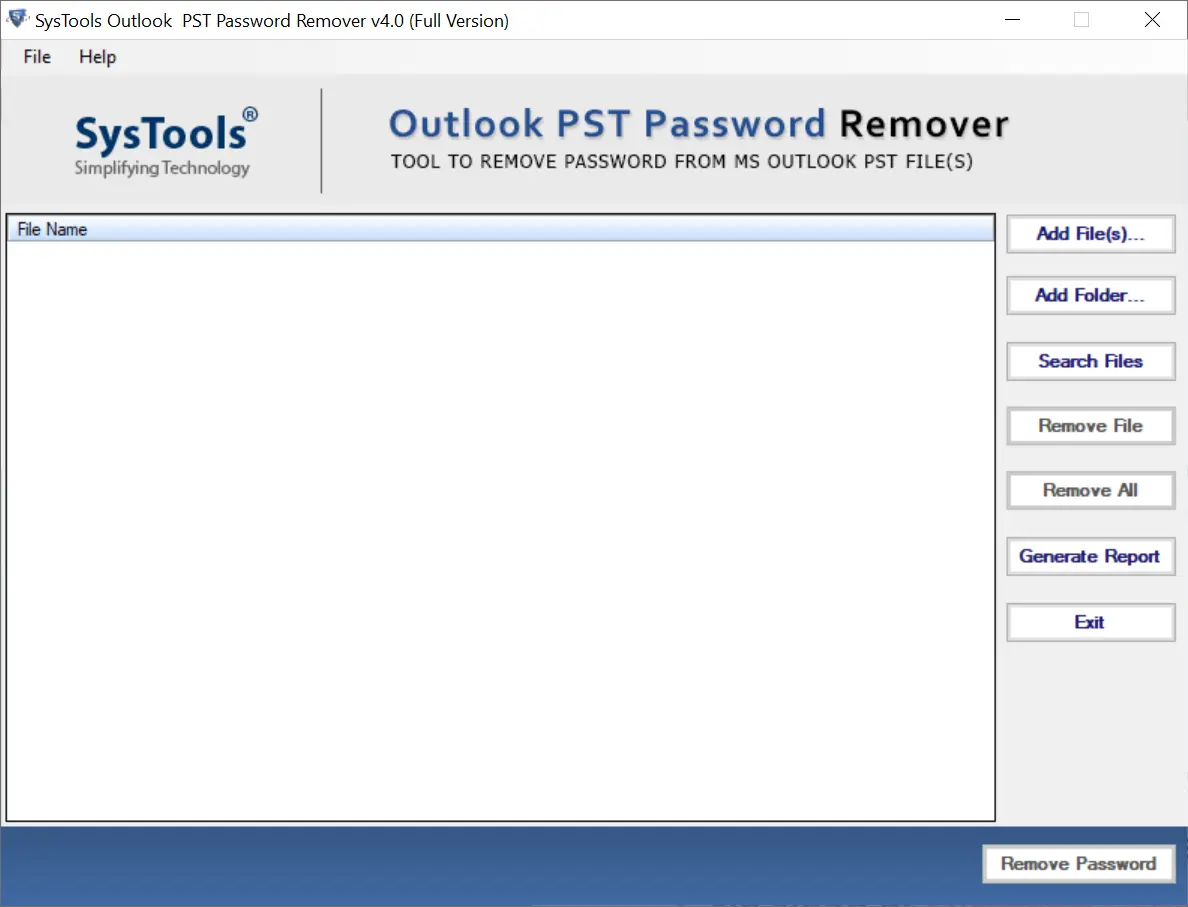
pst password remover

Why Choose Revove PST File Password Recovery Tool?

A tool that seamlessly retrieves passwords from both ANSI and Unicode PST files, operates without needing administrative privileges and requires no installation of Microsoft Outlook. Ideal for anyone needing quick and reliable access to locked Outlook data files, ensures you regain control over your email security and accessibility. With its advanced functionality, this PST password reset tool meets all your needs efficiently.

Advantages of Using PST Password Remover Tool

  • Compatible with all versions of Windows OS.
  • Recover all types password from PST files.
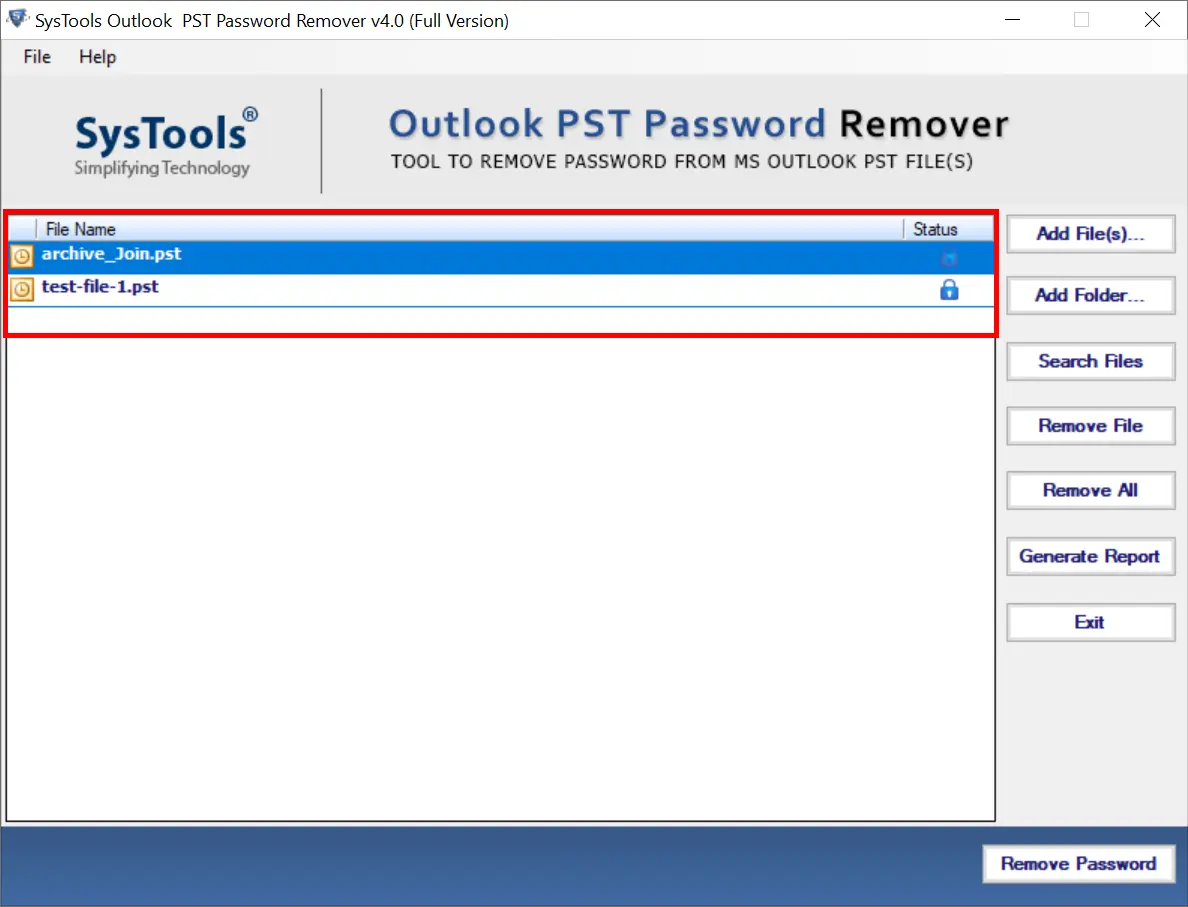
  • Show the Password Protected Lock Icon along with the PST file.
  • 30-day money-back guarantee* if the software does not perform.
  • No file size limit for Outlook pst password remover.
  • User-friendly GUI in a standalone PST unlock software.
  • Lifetime software validity with 1 year of free updates.
pst password unlocker

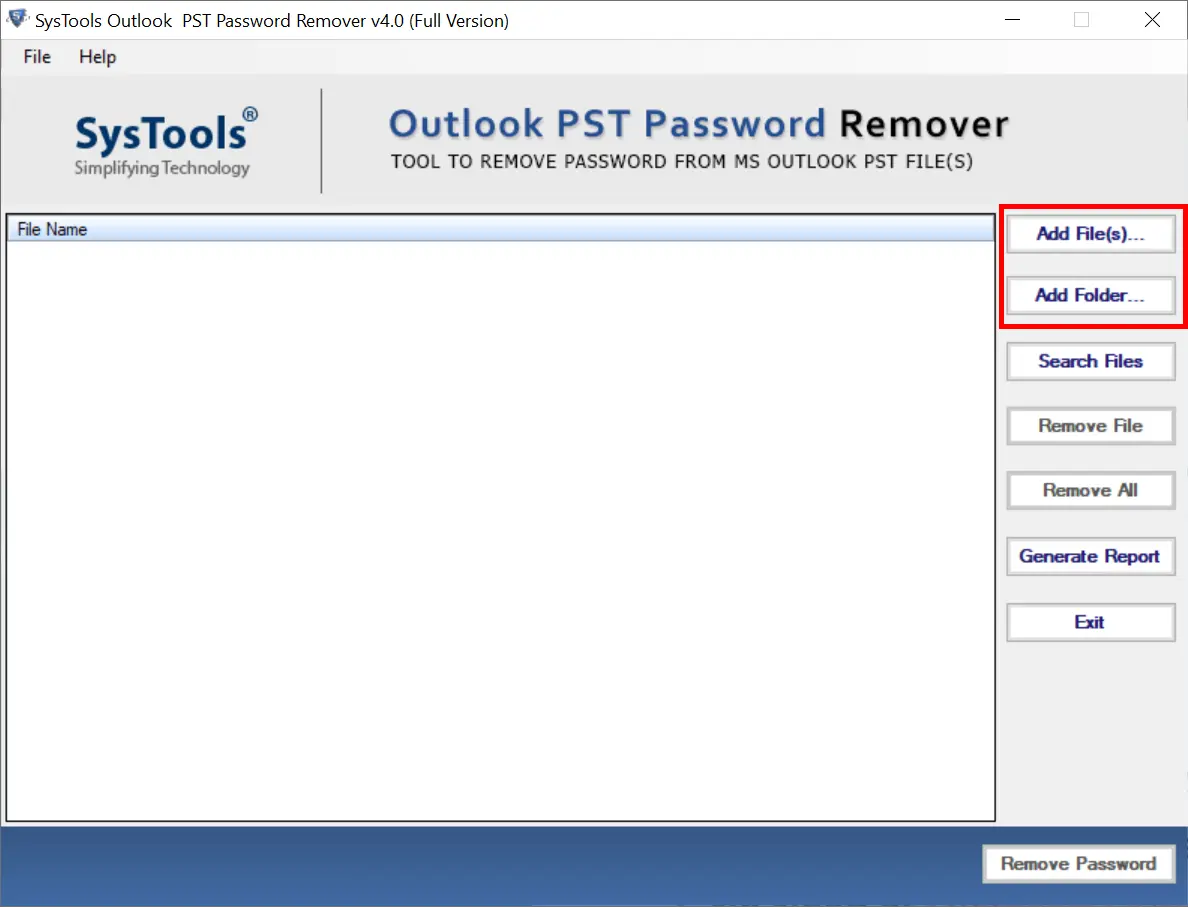
Easy Way to Add Single or Multiple Locked PST Files

Revove PST password recovery software features a “Search File” option that automatically scans and adds password-protected PST files. This process ensures authenticity while addressing all security concerns, thus saving lots of time. Additionally, it provides a detailed report displaying the status of each scanned PST file. Users can easily identify which files are locked with a password and which are accessible without one.

Steps to Use the PST File Password Remover Tool

  • Step-1: First Download PST Unlocker Tool and Install on Windows OS
  • Step-2: Add Locked PST File Using Add File or Add Folder Option
  • Step-3: Check Lock Status of Browsed PST File and Verify
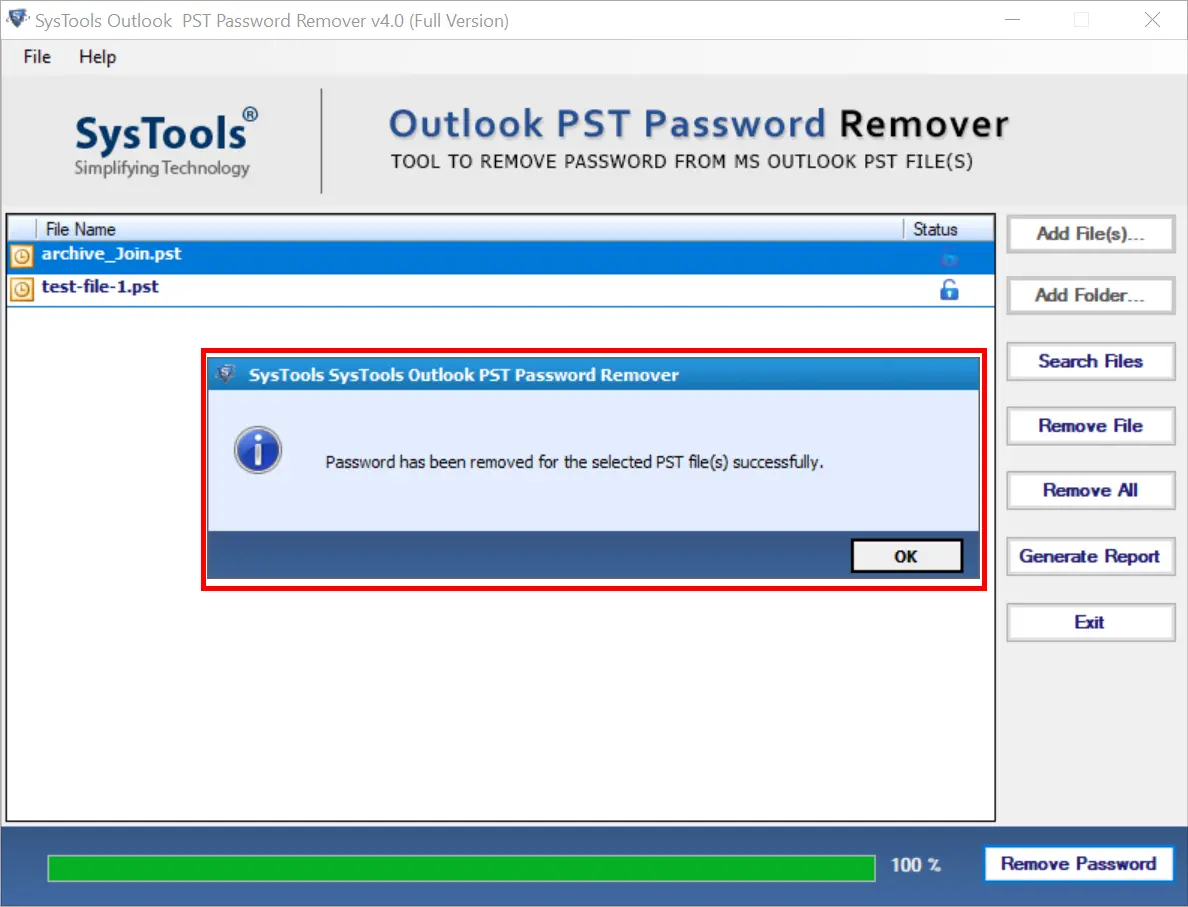
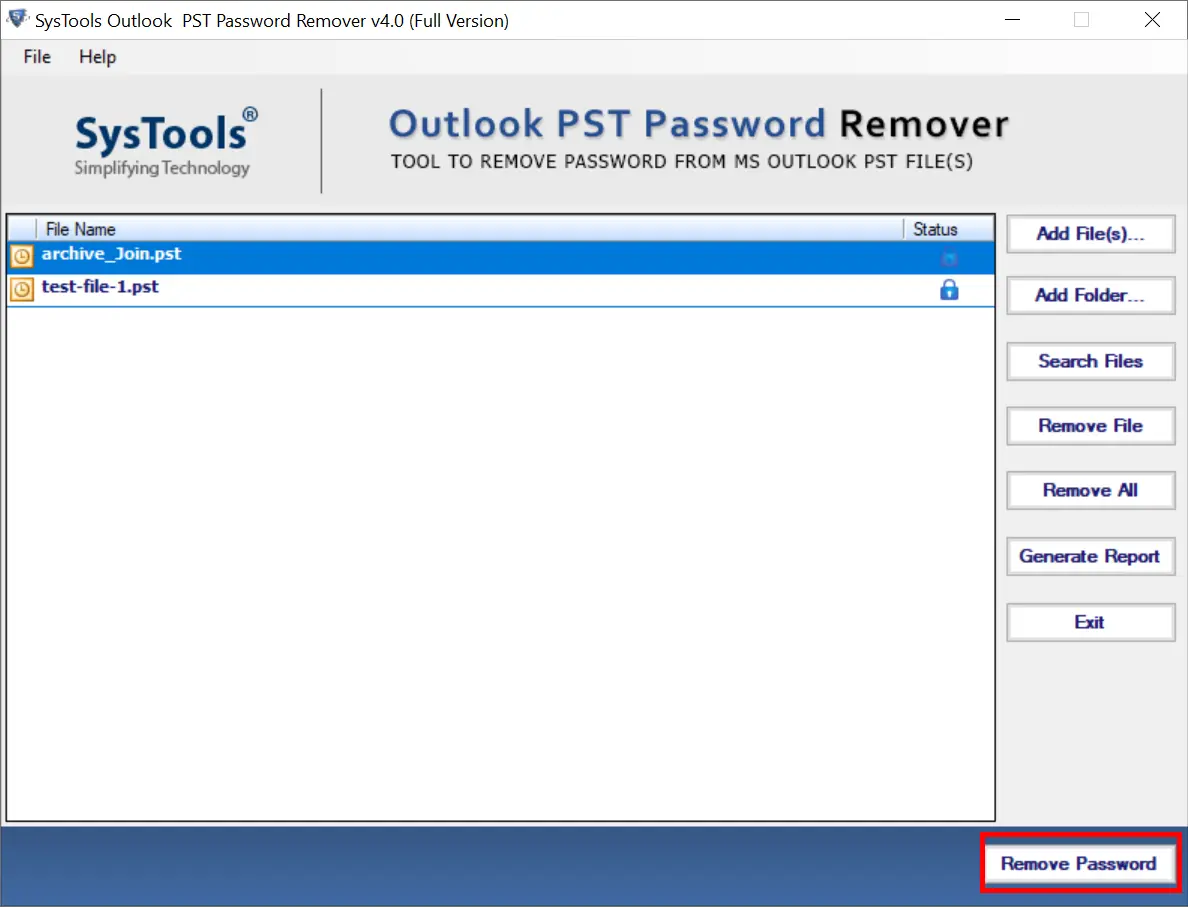
  • Step-4: Click the “Remove Password” Button and Await for Completion
  • Step-5: Software Generates CSV Report After Remove PST File Password

PST Password Recovery Software - Core Features

Unlock Your Password Protected PST Files with this PST Password Unlocker Software

Recover PST File Password in Bulk

With the advanced programming of this wonderful application, you can recover password from multiple PST files in one go. Apart from this, you can select multiple Outlook files and remove the password protection on them later without any problem.

Language-Specific Password Recovery

Password recovery can be done in all cases with the help of this Outlook PST password remover software. That is, whether it is lost/forgotten or multilingual. This utility recovers the password using a combination of alphabets, special characters, numbers or symbols, etc.

Reset Password Without Microsoft Outlook

PST unlocker is a stand-alone utility to recover forgotten PST file passwords. Also, it helps users to open password protected PST files without the need for an Outlook application. It simply means that no Outlook installation is required to recover or remove PST file password.

Complex Password Recovery Options

Revove developed an advanced and reliable software. It allows users to recover password instantly in all situations. Best PST password recovery software for Outlook PST file supports multiple character sets including special characters, numbers or symbols, etc. Also, the software provides easy recovery of such passwords, for example, Ra1012!%R19rA#$I.

Support All Outlook Versions

With the help of this software user can easily remove PST files password can be recovered from any/all versions of Microsoft Outlook. To recover lost or forgotten passwords, the software can process PST file passwords for Outlook 2021, 2019, 2016, 2013, 2010, 2007, and 2003 (i.e., both ANSI and Unicode-type PST files).

Simple Graphical User Interface

This PST password unlocker software is designed with a single-panel layout, it features just one screen, eliminating the need for users to navigate back and forth. As a result, the Graphical User Interface is exceptionally user-friendly and straightforward, accessible to users of all skill levels.

Old Password Removal Feature

The software is designed to facilitate PST password remover. it enables the removal of existing passwords from selected PST files. Once the old password is eliminated, you can save the unprotected PST and secure it with a new password of your choice.

Support For Each Windows OS Version

All Windows operating system versions support the application without any issues. This applies to every version, including Windows 11 and below. Outlook PST password remover software is compatible with both 32-bit and 64-bit OS versions.

PST Password Recovery Tool - Specifications

Download Free Demo Version and Verify Installation Requirements

Download of Software

Size: 19.8 MB

Version: 4.0

Trial Restrictions

Limitations

Free demo version of PST password remover software will show you the status of browsed PST file. Buy full version of this software to remove PST file password.

System Requirements

Hard Disk Space
50 MB of Free Hard Disk Space

RAM
1 GB of RAM

Processor
Intel® Core™ 2 Duo CPU E4600 @ 2.40GHz 2.39GHz

Application Pre-Requisites

  • Install Microsoft.NET Framework version 4.5 or higher.
  • Any legitimate or phony profile/account should have Microsoft Outlook installed and correctly set up.

Supported Editions

  • Microsoft Windows – Win 7 / 8 / 8.1 / 10 (32-Bit & 64-Bit), Windows 11 (64-bit) & Windows Server 2008 / 2012 R2 / 2016 / 2019
  • Microsoft Outlook – 2003, 2007, 2010, 2013, 2016, 2019, 2021 (32-Bit & 64-Bit)

FAQs

Question:Is Your Anti-Virus Blocking the Software Export Process?

Solution:Please Disable Anti-Virus Temporarily / Allow Access (Whitelist) From Anti-Virus Settings For Proper Working of the Software.

Question:Unable to Create Output in Destination?

Solution:Please Avoid Source From NAS, SAN Network, or Shared Drive. The source File Should Be on Migration Machine to Perform Successful Migration.

Digital Delivery

Delivery of this product will be online. You will get the download and activation link of this product in your email after the payment is confirmed.

PST Password Remover Software - Purchase Now

Feature Difference Between Free Demo and Full Version Software

Qualifications

Free Version

Full Version

Browse Any Size PST File in Software

Supports Both ANSI & UNICODE PST File

Show Status of Browsed PST File

Support for Windows 11 and All Previous Versions

Unlock Password Protected PST File Show Password Protected Lock Icon

Cost FREE $29
FAQs

Most Commonly Asked Questions

Common Questions About PST Password Recovery Tool

With the use of this tool, users can easily recover lost passwords of PST files. Follow the below steps:

  • Step-1: Firstly Download and Run the PST File Password Recovery Tool
  • Step-2: Then, Pick the "File(s) Folder" and hit on "OK" button
  • Step-3: The software will display the PST file after exploring the data
  • Step-4: View The Locked PST File Status
  • Step-5: Finally, press on "Remove Password" button to recover the password from PST

Yes, The PST password recovery software does not require any external application such as Microsoft Outlook configured or installed on the system. It is a stand-alone utility to recover passwords from protected pst files.

Yes, PST unlocker software is enriched with advanced algorithms to recover passwords created using any language or symbols.

Yes, PST file unlocker software easily breakdowns the encryption of pst files to have access to it in Outlook.

Yes, this PST Password Recovery Software is compatible with almost all versions of Outlook pst file whether it is 2016 editions or other old versions.

What Clients Say - PST Password Recovery

star rating

4.6
Average Google Rating

Overall Rating

★★★★★

4.8
Average Customer Rating