How to Convert MBOX to HTML: Step-by-Step Guide

If you want to convert MBOX to HTML, import the MBOX format file into Mozilla Thunderbird, install the ImportExportTools NG add-on, and export the file in HTML format. For large files or folder, use a dedicated offline converter tool, which helps you export all emails in one go without requiring any prior knowledge of coding or any technical skill.
Let’s dive deep into the methods and solutions for how to convert MBOX to HTML, covering both manual and offline software solution, which enables you to export all emails without code involved.
What is MBOX to HTML Conversion?
MBOX file– It is a plain-text file, comprising your emails one after the another.Many email clients like Mozilla Thunderbird, Apple Mail, and Gmail use it to store their data.
HTML file– It is a web page format. When an email is saved as HTML, its text, layout, and links are readable in any browser
Conversion– When you convert a MBOX mailbox file, which stores many emails in one plain-text file, into HTML web pages that open browser, it is known as MBOX to HTML conversion.
Why Do We Need to Convert MBOX to HTML?
Conversion of MBOX to HTML is most useful for individuals changing email clients, or want to read old mails or share emails with legal or IT teams that need to share it with others.
- You can print emails or save them as PDF using the browser.
- Converting mails from MBOX to HTML format makes them easier to manage and use.
- HTML files are compatible across vriouos versions of Windows and Mac.
- These HTML files can be easily shared with people and need not require downloading the specific email client for reading them.
- HTML files can be edited with HTML editors, enabling you to modify it as per need.
When you convert emails to HTML, it unlocks a step to convenience and efficiency in sharing and organizing emails without email clients.
How to Convert MBOX to HTML? Methods Explained
There are two ways to convert MBOX to an HTML formatting- a manual method and using a dedicated converter.
Method 1: Convert MBOX to HTML Manually (Free)
There are two options available for doing this conversion manually– use Thunderbird which does not require coding skills or else, you can use a Python script.
Option A: Use Thunderbird (No Coding)
Mozilla Thunderbird is a free email client and with a help of an add-on like ImportExportTools NG, you can export its emails as HTML.
Follow these steps–
- Step 1: Install Thunderbird and open its dashboard.
- Step 2: Go to Add-ons, search for ‘ImportExportTools NG’, and install it.
- Step 3: Click on ‘Local Folders’, then select ‘ImportExportTools NG’, then ‘Import mbox file’.
- Step 4: Import file(s) or folder you want to convert and export.
- Step 5: after choosing the files, open the import folder and select option ‘Export all messages in the folder’, and at last choose ‘HTML’ as the export format.
- Step 6: Select a destination folder on your local device, and now you can open any file in the browser just by double-clicking on it.
Option B: Use a Python Script (All-in-One File)
The python script to convert MBOX to HTML helps to combine all your emails into a single HTML page with a clickable index. Each email is placed inside a sandboxed frame, so pages do not get affected by any styling or scripts.
import mailbox

import html

from email.header import decode_header, make_header

def decode(value):

return str(make_header(decode_header(value))) if value else ""

def get_body(msg):

if msg.is_multipart():

for part in msg.walk():

disposition = str(part.get("Content-Disposition"))

if part.get_content_type() == "text/plain" and "attachment" not in disposition:

payload = part.get_payload(decode=True)

if payload:

return payload.decode(part.get_content_charset() or "utf-8", errors="replace")

else:

payload = msg.get_payload(decode=True)

if payload:

return payload.decode(msg.get_content_charset() or "utf-8", errors="replace")

return ""

mbox = mailbox.mbox("input.mbox")

with open("output.html", "w", newline="", encoding="utf-8-sig") as f:

writer = html.writer(f)

writer.writerow(["From", "To", "Cc", "Subject", "Date", "Body"])

for msg in mbox:

writer.writerow([

decode(msg["From"]),

decode(msg["To"]),

decode(msg["Cc"]),

decode(msg["Subject"]),

msg["Date"],

get_body(msg).replace("\n", " ").strip(),

])
Method 2: Convert MBOX to HTML with an offline Tool
A tool such as Revove’s MBOX Converter is a dedicated desktop tool that can read MBOX file directly and export them as web pages. It can import a large file or multiple files at once, and can be easily used by people who do not wish to use Thunderbird or have no technical knowledge about codes.
Follow these steps–
- Step 1: Download and install the MBOX to HTML converter on your Windows or Mac from Revove’s original website.

- Step 2: Click Add File (or Files) option to add one or multiple MBOX files to convert.

- Step 3: Preview your selected files to confirm you loaded the correct files.

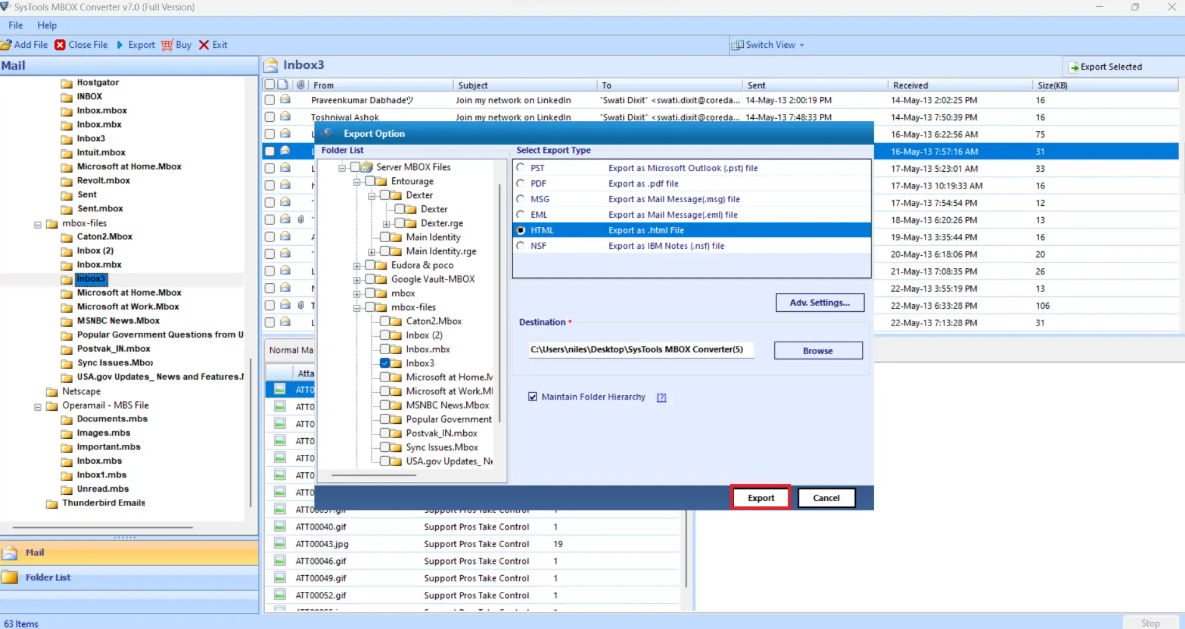
- Step 4: Select the destination folder, where you want to save the HTML files.

- Step 5: Select the export format as HTML, by choosing it from the given list of formats.
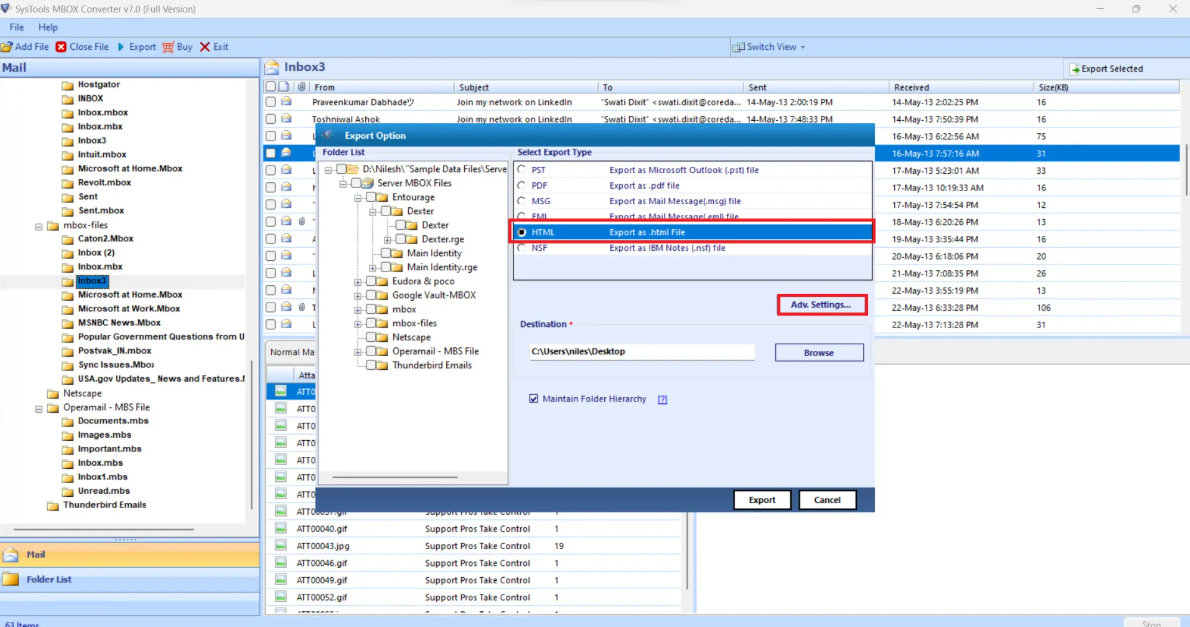
- Step 6: Choose the fields you need to export from the given options and apply filters.
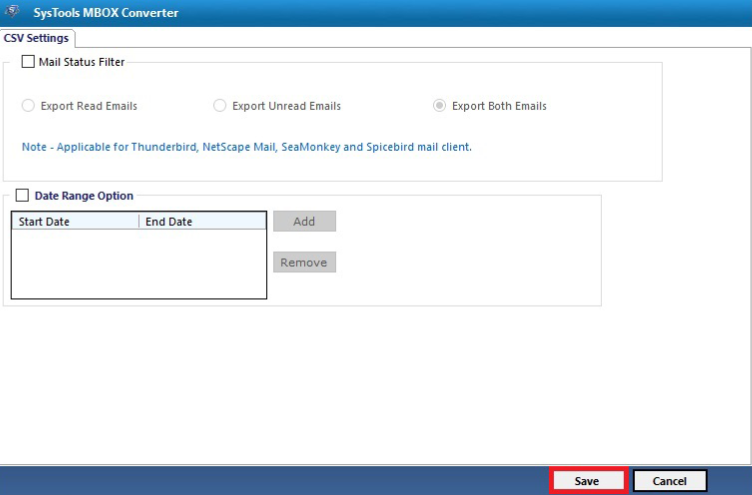
- Step 7: Click Convert, and then you can open the file in Excel or Google Sheets.
Features That Matter in an MBOX to HTML Converter
- Multiple files can be processed at once.
- Preserves formatting and images in emails.
- Offers filters like date, sender, and subject to show only specific part in the HTML file after conversion.
- Works completely offline with no third-party server involved.
- Does not require installation of any email client like Thunderbird.
Which MBOX to HTML Method Should You Choose?
| Problem | Use Case |
|---|---|
| One MBOX file, one-time conversion, comfortable installing software | Thunderbird |
| You know coding and want every email in a browsable file | Python script |
| Large or multiple files, or you need filters to apply to the resulting files | MBOX to HTML converter |
| Emails are confidential (legal, financial, personal) | Revove Offline MBOX to HTML converter |
Conclusion
If you are looking for easy and reliable methods that can convert MBOX to HTML, first check what type of file you need to convert. Thunderbird or a Python script works for small, one-time conversion requirements. You can split large MBOX files into smaller files, or the convert large, bulk, or confidential emails using an offline MBOX to HTML converter. It is the optimal choice in this case. But keep in mind, before applying any method on your file, always back up your files before testing or test a method using a sample file.
FAQs about MBOX to HTML
- How much time does it take to convert MBOX to HTML?
Ans. The time duration highly depends upon the file size and method. A small MBOX file can be converted in minutes while a large or bulk files can take unusual time to process in Thunderbird. A converter tool can easily process both types of files faster than Thunderbird or a Python code. - Can I convert MBOX to HTML without internet connection?
Ans. Yes. Thunderbird, Python scripts, and even dedicated tools work offline and convert your MBOX files to HTML. - Is there a limit for file size for conversion to HTML?
Ans. Most manual methods do not have any file size limit, but can work comparatively slow on large MBOX files. An offline converter handles large files more reliably and converts faster. - Can converted HTML email files open in every browser?
Ans. Yes. HTML is a standard format, and can be opened in Chrome, Edge, Firefox, Safari, and mobile browsers as well. - Can I convert MBOX to HTML on Mac?
Ans. Yes. The Revove offline converter has versions available, both for Windows and Mac. You should carefully check the prerequisites of the tool before using it.